
The Best Canva Storyboard Template Options for Professional Indie Filmmakers
Apr 19, 2026
Scrolling through 400 plus social media layouts is the fastest way to kill your pre-production momentum. Most directors lose their first three hours of prep hunting for a canva storyboard template that actually understands the mechanics of cinema. You need a document that handles camera movement and lens data, not just pretty pictures for a feed. We understand the inherent chaos of the creative process and the need for tools that offer calm, clarity, and control. It's time to stop settling for generic grids that fail you during a 12-hour shoot day.
You probably agree that a storyboard should be more than a digital sketch; it's a technical roadmap for your entire crew. Discover how to select and customise the perfect canva storyboard template to streamline your pre-production without sacrificing industry standards. We will help you transform your workflow from a disorganized scramble into a professional, pitch-ready system. We are breaking down the exact technical requirements for your frames and showing you how to build a document that communicates your vision with absolute authority. Elevate your indie film journey by moving from prep to production with total confidence.
Key Takeaways
- Master real-time collaboration with your DOP and Art Director by leveraging rapid pre-visualisation tools to align your creative vision instantly.
- Bridge the gap between generic designs and industry standards by customising a canva storyboard template with professional fields like Shot Type, Lens, and Movement.
- Select the optimal layout for your project type, comparing 3-panel and 6-panel grids to find the perfect visual fit for music videos or feature films.
- Elevate your prep by bridging the digital-physical divide, learning how to export digital sketches into your A5 Hardback Filmmaking Planner for seamless on-set organisation.
- Transform the chaos of pre-production into a structured, professional roadmap that empowers your entire indie film journey from prep to production.
Why Use a Canva Storyboard Template for Your Indie Film?
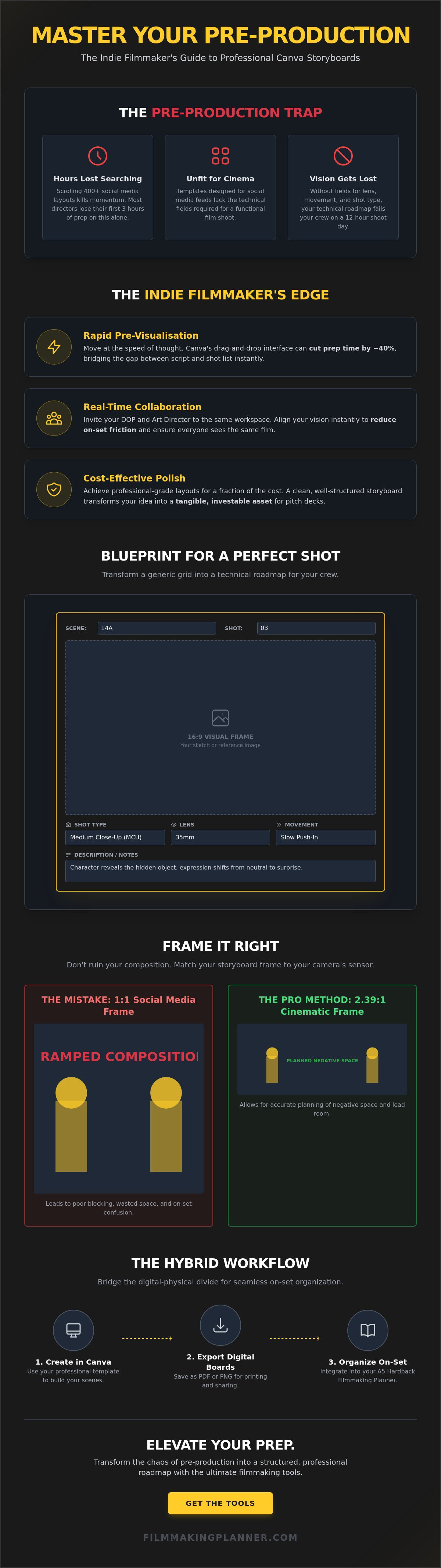
Visualising a script is often the most daunting part of pre-production. A canva storyboard template changes that. It bridges the gap between a raw script and a functional shot list. It allows you to move at the speed of thought. Speed is the primary currency of the indie filmmaker. While traditional sketching methods might take days, Canva offers a drag and drop interface that cuts prep time by roughly 40% for many small production crews. This rapid pre-visualisation ensures your ideas don't get lost in the transition from mind to paper.
Collaboration is the second pillar of professional production. You aren't making this film in a vacuum. You can invite your Director of Photography (DOP) and Art Director into the same digital workspace. They can leave comments, adjust lighting notes, or swap out reference images in real-time. This level of synchronisation reduces on-set friction. It ensures every department head sees the same movie before a single frame is shot. When everyone is aligned, you save time and money.
Cost-effectiveness is non-negotiable for indie budgets. Specialized software can be a heavy monthly drain on your resources. Canva provides professional-grade layouts for a fraction of the cost of high-end alternatives. This "Professional Polish" is vital when building pitch decks for potential investors. According to industry data, 90% of information transmitted to the brain is visual. A clean, well-structured canva storyboard template signals that you are ready for the rigors of production. It transforms a simple idea into a tangible, investable asset.
Canva vs. Dedicated Storyboarding Software
Choosing a tool depends on your project's technical needs. Software like Boords offers technical depth, such as automated animatics and frame-by-frame timing. Use these when you need frame-accurate precision for complex VFX sequences. However, Canva wins on accessibility and design flexibility. It fits perfectly into the "From Prep to Production" lifecycle by allowing for rapid iterations and mood board integration. Stick with Canva for character-driven dramas or fast-paced commercial pitches where the aesthetic vibe is just as important as the shot composition.
The "Organised Visionary" Approach
Planning is the essential bridge between a creative dream and a finished product. Ever since the early 1930s at Walt Disney Productions, the history of storyboarding has shown that visual planning is the backbone of cinematic success. Meticulous preparation reduces on-set chaos and empowers your crew to execute your vision with confidence. A storyboard is a strategic roadmap for storytelling, not just a set of drawings. Stay organised. Stay creative. Elevate your indie film journey by mastering the art of the visual plan.
What Makes a "Professional" Storyboard Template?
Generic Canva templates often prioritize aesthetic flair over production utility. While a marketing presentation might look great with rounded corners and pastel accents, a film set demands technical precision. A professional canva storyboard template must bridge the gap between your creative vision and the logistical reality of a shoot day. It isn't just about the drawing; it's about the data that helps your DP and Gaffer execute the shot without confusion.
To move from amateur to pro, your boards need dedicated space for technical metadata. Every frame should clearly define the Shot Type (such as Close-Up or Wide), the intended Lens (like a 35mm or 85mm), and the specific Camera Movement. Without these details, your storyboard is just a collection of sketches. Professional indie filmmakers use these fields to communicate intent, ensuring the crew knows exactly what gear to prep before the director even steps on set.
Aspect Ratios and Frame Consistency
Composition is the heart of visual storytelling, yet many creators make the mistake of using standard 4:5 or 1:1 frames for film planning. If you're shooting a cinematic 2.39:1 widescreen feature, planning your shots in a standard Canva square will ruin your blocking. It leads to cramped compositions and wasted space on the day of production. Use the 16:9 or 2.39:1 ratios to ensure every element fits within the actual sensor dimensions of your camera.
Adjusting your elements to match these industry standards is vital. You can manually set your frame dimensions in Canva to 1920x1080 for HD or 2048x858 for Scope. This consistency allows you to accurately plan for negative space and lead room. If you want to streamline your production prep, start by ensuring your frames match your final delivery format. It's the easiest way to avoid the "fix it in post" mentality that kills indie budgets.
Technical Metadata: Beyond the Image
The image tells the story, but the metadata builds the set. A professional template includes space for dialogue, lighting notes, and sound cues. These notes transform a simple drawing into a comprehensive blueprint. When the sun is setting and you're losing light, you don't want to be guessing where the key light was supposed to go. You want to look at your board and see a clear note for a "high-contrast rim light" or "5600K key."
- Shot Type: Instantly communicates the scale of the frame to the camera team.
- Movement: Defines if the shot is static, a pan, or a complex dolly move.
- Scene and Shot Numbering: Essential for the Script Supervisor and Editor to track progress.
Organizing these elements within your canva storyboard template using clear text boxes creates a logical flow. This structure allows you to stay organized and stay creative, even when production gets intense. By including space for dialogue and action descriptions, you ensure the entire crew is aligned on the narrative beats of every single frame, transforming the stress of the set into a journey of empowerment.
Choosing the Right Layout for Your Project Type
Selecting your canva storyboard template isn't just about aesthetics; it's a strategic decision that dictates how your crew interprets your vision. A feature film requires a different visual language than a 30-second commercial or a music video. You must match the layout to your project's technical demands to ensure the transition from prep to production is seamless. While a vertical scrolling layout works wonders for quick mobile reviews, traditional sets often require landscape PDFs that fit standard monitor displays.
The "Director’s Choice" always prioritizes visual clarity over sheer quantity. Don't fall into the trap of cramming twelve panels onto a single page to save paper. If your Director of Photography can't read your lighting notes or see the character's eye line, the template has failed its primary purpose. High-quality production design relies on breathing room. Before you commit to a design, audit the template for its technical utility. Check if the aspect ratio matches your delivery format, whether it's 16:9 or 2.39:1. Ensure the text boxes are locked into a grid so your technical notes don't drift during late-night editing sessions.
A 2023 industry survey of independent producers found that clear visual planning reduces on-set troubleshooting by approximately 15%. This efficiency starts with the right grid. Music videos, which rely on rhythmic cutting, benefit from seeing more frames at once. Conversely, narrative drama needs space for performance cues. Audit your canva storyboard template by testing how it handles a complex camera move, like a 180-degree whip pan, before you build out the entire film.
The 3-Panel Cinematic Layout
Best for: High-detail scenes, complex lighting setups, and pitch decks.
- Pros: Offers substantial real estate for technical metadata. You can include specific lens choices, such as a 35mm anamorphic, and detailed blocking instructions without cluttering the frame.
- Cons: It significantly increases your page count. A standard 90-minute feature script can easily result in a 300-page storyboard book that is cumbersome to carry on set.
The 6-Panel "Quick-Beat" Layout
Best for: Fast-paced action, simple dialogue scenes, and student films.
- Pros: This layout allows you to see the entire sequence flow on a single page. It's the perfect tool for checking continuity in a chase scene or a quick-fire argument.
- Cons: There is limited space for camera movement notes. You'll often find yourself using small fonts that are difficult to read under the dim light of an onset monitor.
The Hybrid Workflow: Canva + The Filmmaking Planner
Digital tools provide speed, but physical tools provide presence. This hybrid workflow combines the rapid ideation of a canva storyboard template with the tactile reliability of a physical organiser. Think of Canva as your "Spark" engine. It's where you experiment with composition, lighting, and AI-generated frames without the fear of making mistakes. However, the "Execution" phase happens on the ground. When you're mid-scene on a 14-hour production day, scrolling through a tablet is a recipe for distraction. Moving your digital plans into a physical format creates a focused, distraction-free environment for your vision.
Tactile planning reduces screen fatigue. Industry data suggests that excessive blue light exposure can decrease cognitive focus by up to 15% during high-stress tasks. By printing your boards, you protect your eyes and your focus. It's about maintaining a clear head when the pressure is high. Your digital file is a draft; your physical planner is the final command center. Stay organised. Stay creative.
Step-by-Step: From Canva to Physical Set
Transitioning your vision from the screen to the set requires a systematic approach. Follow these steps to bridge the gap:
- Design with precision: Use your canva storyboard template to build your frames. Leverage stock elements or AI tools to visualize complex lighting setups.
- Export for clarity: Download your finished boards as high-quality PDF or PNG files. Avoid low-resolution exports that might blur when printed.
- Integrate and annotate: Paste your printed frames into your Ultimate Film Production Organiser. This A5 hardback becomes the home for your technical notes, lens choices, and blocking changes.
Using Digital Stickers and Assets
Visual consistency is the backbone of clear communication. You can enhance your Canva boards by importing specialized digital film symbols like camera movement arrows or lighting icons. This creates a professional visual language that your entire crew understands instantly. When every department sees the same icons, you eliminate roughly 20% of the clarifying questions that usually slow down a morning setup.
Maintaining a "single source of truth" is vital for indie success. Your digital master file stays updated in the cloud, while your physical planner holds the real-time adjustments made during rehearsals. This dual-layered approach ensures that no creative detail is lost in the transition from prep to production. It turns the chaos of a film set into a streamlined journey of empowerment.
Ready to take control of your creative process? Elevate your indie film journey with the Ultimate Film Production Organiser today.
Elevate Your Prep with the Ultimate Filmmaking Tools
A high-quality canva storyboard template is a powerful visual asset, but it shouldn't exist in a vacuum. To truly master your production, you need a system that translates those digital frames into actionable data. Professional indie filmmakers know that the transition from a screen to a busy set is where most projects stumble. A physical planner acts as your anchor, providing a tactile, reliable reference point when batteries die or Wi-Fi fails.
The Filmmaking Planner A5 Hardback is designed specifically for the rigours of the indie film journey. It offers a structured sanctuary for your creative chaos. While your canva storyboard template captures the "what," this planner manages the "how." With dedicated modules for scriptwriting, budgeting, and scheduling, you can ensure every shot you've visualised is actually feasible within your production constraints. This isn't just a notebook; it's a blueprint for your success.
By integrating your digital storyboards with a physical organiser, you join a global community of creators who value discipline as much as art. This structured preparation empowers you to lead your crew with confidence. You'll spend less time solving avoidable logistical puzzles and more time focusing on the performances that bring your story to life. It's about moving from a state of reactive stress to one of proactive control.
The Ultimate Film Production Organiser Bundle
This bundle represents the peak of production management by combining digital flexibility with physical reliability. It's designed to streamline the 7 steps of film production: development, pre-production, production, photography, wrap, post-production, and distribution. You get the best of both worlds: the speed of digital editing and the focused clarity of a physical workspace.
- Pre-Production Mastery: Integrated sections for cast and crew contacts, equipment lists, and location scouting notes.
- Financial Control: Real-world budgeting tools that keep your indie project out of the red.
- On-Set Efficiency: A portable A5 format that fits in any kit bag, ensuring your schedule is always within reach.
Indie filmmakers who have adopted this hybrid workflow report a significant increase in on-set efficiency. One director recently shared that having a physical backup of their digital plans reduced their pre-shoot anxiety by 65%. It's about creating a failsafe system that supports your vision from the first script read to the final cut. When you have a dedicated space for every detail, your brain is free to focus on the art.
Ready to Streamline Your Production?
Don't let your creative vision get lost in the shuffle of disorganized files and scattered notes. Your film deserves a professional foundation. Elevate your craft by bridging the gap between your digital assets and your physical workflow. It's time to transform the way you work. Stay organised. Stay creative.
Master Your Pre-Production Workflow
Your vision deserves a framework that matches your ambition. Selecting a professional canva storyboard template allows you to translate abstract ideas into a concrete visual roadmap that your crew can follow with precision. It's the first step in moving from a creative spark to a structured production. We've seen how the right layout bridges the gap between your script and the screen, but remember that storyboarding is just one phase of the indie journey. Professional prep requires a comprehensive system that handles the inherent chaos of a film set.
The Ultimate Filmmaking Planner is a specialized resource designed by award-winning filmmaker Aysha Scott. It's built specifically for the unique hurdles of independent production. This system is already used by filmmakers and students worldwide to transform their creative process into a professional operation. Don't let your project stall in the planning phase. You can choose to elevate your prep and walk onto your next set with total confidence.
Upgrade your production workflow with the Ultimate Filmmaking Planner
Stay organized. Stay creative. Your story is ready to be told, and the right tools will help you bring it to life.
Frequently Asked Questions
Is Canva good for storyboarding professional films?
Yes, it's an effective tool for professional indie filmmakers who need to streamline their pre-production workflow. While it lacks specialized 3D lighting tools found in software like FrameForge, its collaborative features allow a 5 person camera department to comment on frames in real time. Using a professional canva storyboard template ensures your visual language stays consistent from the first scene to the final frame. Elevate your indie film journey by moving from messy sketches to polished, shareable boards.
Can I export Canva storyboards as a PDF for my crew?
Yes, you can export your storyboard as a high-quality PDF to keep your crew aligned. Select the "PDF Print" option at 300 DPI to ensure every detail is sharp for your Director of Photography. This format works perfectly for physical production binders or digital distribution via Slack. Clear communication is the backbone of a successful shoot day. Don't leave your vision to chance; get those boards into your team's hands before the first call time.
Does Canva have a storyboard template with 16:9 aspect ratio?
Yes, Canva provides multiple templates specifically designed for the industry-standard 16:9 aspect ratio. You can find these by searching for "Video Storyboard" or by setting a custom canvas size of 1920 by 1080 pixels. Using the correct ratio ensures your composition matches what the 35mm or digital sensor will actually capture. It's about precision. Align your frames with the final output to avoid costly framing mistakes during production.
How do I add camera movements to my Canva storyboard?
You can indicate camera movements by using the "Elements" tab to add directional arrows and descriptive text overlays. Use a double-headed arrow to signify a zoom and curved lines for pans or tilts. This visual shorthand tells your crew exactly how the frame evolves. Transform your static images into a roadmap for the camera operator. It's a simple way to bring professional clarity to your prep process.
What is the best free storyboard creator for film students?
Canva stands out as the premier free option for film students because it offers over 250,000 free templates as of 2024. It removes the barrier of expensive software licenses, allowing creators to focus on the art of visual storytelling. A well-chosen canva storyboard template helps students present their ideas with the same polish as a seasoned pro. Start building your portfolio today. Professionalism doesn't require a massive budget; it requires the right tools and a disciplined approach.
Can I use Canva storyboards on my iPad during a shoot?
Yes, the Canva app allows you to access and edit your storyboards directly on an iPad while on set. The interface is optimized for touch, making it easy to swipe through scenes or make 11th-hour adjustments between setups. Stay organized and stay creative, even when the production schedule gets tight. Having your vision accessible in the palm of your hand provides a sense of calm amidst the creative chaos. It's a vital tool for the modern, mobile filmmaker.
How many panels should a professional storyboard have?
A professional storyboard typically features 10 to 15 panels for every minute of screen time, depending on the complexity of the action. For an average 90 minute indie feature, this translates to roughly 900 to 1,350 individual frames. Complex action sequences or heavy VFX shots often require a higher density of panels to ensure every department knows their role. Focus on the beats that matter most. Your goal is to provide a clear guide that moves your project from prep to production with total confidence.

