

The Ultimate Storyboard Template PDF: A Professional Guide for Indie Filmmakers
Apr 20, 2026
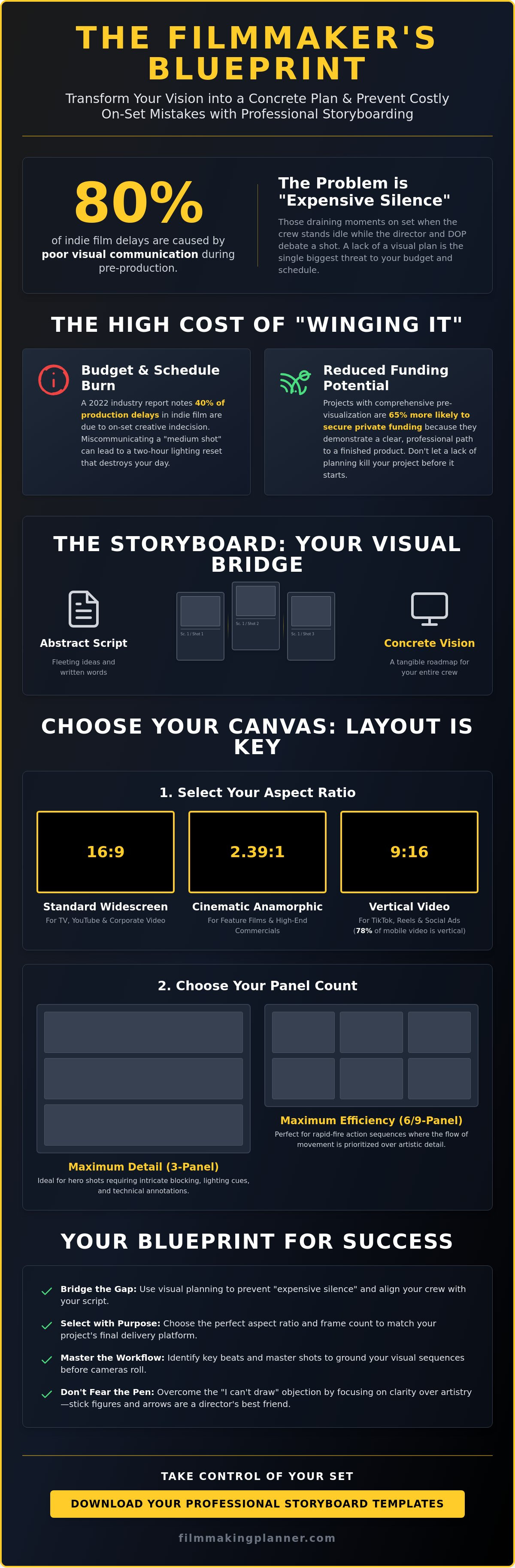
Your most expensive mistakes don't happen on camera; they happen in the silence between your vision and your crew's understanding. Industry data shows that 80% of independent film delays are the direct result of poor visual communication during the prep phase. You've likely felt that crushing weight of being disorganized, or the frustration of failing to explain a complex tracking shot to your DOP while the light is fading. It's time to stop guessing and start directing. By utilizing a professional storyboard template pdf, you transform abstract ideas into a tangible roadmap that empowers your team and protects your budget.
We understand the grueling reality of independent production. Our mission is to help you stay organized and stay creative. In this guide, you’ll download professional storyboard templates and master the frameworks needed to streamline your pre-production workflow. We'll show you how to bridge the gap between a creative dream and a professional product. From shot composition to crew alignment, this is your blueprint to elevate your indie film journey and take total control of your set.
Key Takeaways
- Bridge the gap between your script and the screen by using visual planning to prevent "expensive silence" during production.
- Select the perfect aspect ratio and frame count to ensure your technical prep aligns with your cinematic vision.
- Download a professional storyboard template pdf to streamline your pre-production and begin mapping out your next project with authority.
- Master the professional workflow of identifying key beats and master shots to ground your visual sequences before the cameras roll.
- Move beyond loose sheets and learn how to elevate your prep by housing your creative vision in a permanent, durable format.
Why Every Indie Production Needs a Storyboard Template PDF
Every frame starts as a fleeting thought, but thoughts don't direct a crew. The storyboard acts as the essential visual bridge between your script and the final screen. While the history of storyboarding traces back to the 1930s animation era at Disney, its role in modern live-action indie film is more critical than ever. Utilizing a professional storyboard template pdf transforms abstract ideas into a concrete roadmap for your team. It effectively prevents "expensive silence," those draining moments on set when 20 crew members stand idle while the director and DOP debate a lens choice. Preparation provides a psychological shield. It gives directors the confidence to lead and producers the data needed to secure buy-in. Industry data suggests that projects with comprehensive pre-visualization are 65% more likely to secure independent private funding because they demonstrate a clear path to completion.
The Problem with "Winging It" on Set
Walking onto a set without a visual plan is a fast way to burn your budget. A 2022 industry report noted that 40% of production delays in independent film are caused by creative indecision. When you wing it, you risk miscommunicating with your Director of Photography. A misunderstood "medium shot" can lead to a two-hour lighting reset that kills your schedule. Visual prep is a budget-saving tool that ensures every department stays aligned. It turns a chaotic shoot day into a precise execution of your vision. Don't let your creative spark get extinguished by the high cost of poor planning. Stay organized. Stay creative.
Digital vs. Tactile: Finding Your Creative Flow
Choosing your medium is the first step in the "Organized Visionary" workflow. Digital PDFs offer unparalleled speed and the ability to share updates with your London-based crew instantly. Physical planners, however, provide a tactile focus that screens often disrupt. Many directors in the London indie scene now adopt a hybrid approach. They sketch initial ideas by hand to tap into their raw creativity, then finalize them in a storyboard template pdf for professional distribution. This method balances the permanence of a physical planner with the efficiency of digital tools. Elevate your indie film journey by choosing the format that keeps your momentum high and your vision clear.
Choosing the Right Storyboard Layout for Your Project
Selecting your storyboard template pdf is a foundational decision that shapes your entire production workflow. It isn't just about finding a space to sketch. It's about defining the visual language of your film. Your layout choice dictates how you communicate with your crew; it bridges the gap between a vague concept and a concrete shot list. Focus on the canvas before you touch the pen. A well-chosen layout provides the structure needed to transform creative chaos into a professional plan.
Understanding Aspect Ratios (16:9, 2.39:1, 9:16)
Aspect ratio is the most critical choice in any template. It defines the physical boundaries of your cinematic world. 16:9 remains the standard for television and digital platforms. Cinematic features often push wider to 2.39:1 to capture expansive London landscapes or tense group dynamics. Recently, 9:16 has dominated the commercial market. 78% of mobile users consume video vertically, making this layout essential for social content creators. Match your template to your delivery platform to ensure your composition translates perfectly to the final screen.
| Aspect Ratio | Primary Project Type |
|---|---|
| 16:9 | TV, YouTube, Corporate Video |
| 2.39:1 | Cinematic Feature Films, High-end Commercials |
| 9:16 | TikTok, Instagram Reels, Social Ads |
Panel Counts: Detail vs. Efficiency
Choose your panel count based on the complexity of your sequence. A 3-panel layout offers maximum space for intricate blocking and lighting cues. It's the preferred choice for hero shots that require specific technical annotations. If you're getting started with storyboarding, you might find that 6-panel or 9-panel layouts work better for rapid-fire action sequences. These denser layouts prioritize the flow of movement over artistic detail. Align your choice with the 7 steps of production. Use high-detail layouts for the creative development phase and high-efficiency layouts for the final on-set shot list.
Don't ignore the white space on your storyboard template pdf. Professional production requires room for lens choices, camera movement, and dialogue snippets. This metadata is what transforms a drawing into a blueprint. Decide between vertical and horizontal PDF layouts based on your viewing device. Horizontal layouts suit traditional printing and desktop monitors. Vertical layouts are superior for digital tablets or quick scrolling during a fast-paced shoot. Stay organised. Stay creative. Elevate your prep by choosing a tool that fits your specific vision. Explore our collection of professional templates to find your perfect match.
How to Use a Storyboard Template Like a Professional Director
Directing starts long before you arrive on set. It begins with your storyboard template pdf. To work like a seasoned pro, you must view each panel as a decision, not just a drawing. Follow these five steps to transform your vision into a functional roadmap for your crew.
- Step 1: Identify the Key Beat. Every scene contains a moment where the emotional power shifts or a crucial piece of information is revealed. Identify this beat before you pick up a pencil. Draw this frame first to ensure your entire sequence builds toward it.
- Step 2: Establish the Master Shot. Ground your sequence by sketching a wide master shot. This provides a visual reference for the geography of the space, helping the cast and crew understand where everyone stands.
- Step 3: Use Technical Shorthand. Don't get bogged down in fine art. Use simple shapes and standard industry abbreviations to communicate shot types and camera moves instantly.
- Step 4: Annotate Dialogue and Sound. Include snippets of dialogue and essential sound cues. A door slam or a whispered line can change how you frame a shot.
- Step 5: Review for Pacing. Look at your panels in sequence. Ensure the visual flow feels intentional and the transitions between shots don't break the 180-degree rule.
Essential Annotations: Shot Types and Camera Movement
Clear communication prevents chaos during a 12 hour shoot day. Your storyboard template pdf should use standard abbreviations to tell your Director of Photography exactly what you need. Use WS for Wide Shots to show the environment, MCU for Medium Close Ups to capture emotion, and CU for tight Close Ups. If the scene requires a character's perspective, label it POV.
Indicate camera movement with bold arrows. A straight arrow pointing toward the subject signifies a dolly-in, while curved arrows represent pans or tilts. Every movement requires camera motivation. This is the narrative "why" behind the camera's shift, ensuring the lens follows the story's emotional logic rather than moving without purpose.
Beyond the Sketch: Dialogue and Timing
Your storyboard functions as a technical blueprint for the entire production. Use the notes section to specify lens requirements, such as a 35mm for a natural feel or an 85mm to compress the background. Detail your lighting needs here too, noting if a shot requires "high contrast" or "soft morning light."
Estimate the duration of each shot in the margin. If a reaction shot needs 3 seconds to land, mark it clearly. This helps you calculate the total scene runtime and manage your schedule. Always number your panels. This allows the Assistant Director and Script Supervisor to track progress and maintain the production's rhythm. Stay organised. Stay creative.
Overcoming the "I Can’t Draw" Objection
Many indie filmmakers stall during prep because they believe a storyboard must be a gallery-worthy masterpiece. This is a myth that kills momentum. Your storyboard template pdf is a functional blueprint for your crew, not an art project. Clarity of information always beats artistic skill on a fast-moving set. In a 2023 survey of professional cinematographers, 74% stated that clear spatial information is more valuable than high-fidelity rendering. If your DP knows where the camera sits and which way the actor moves, the drawing has done its job.
Focus on the frame. Your goal is to translate the vision from your head onto the page so your team can execute it. Don't let a lack of formal illustration training stop you from professional prep. High-end productions often use "scamps" or rough sketches that look like scribbles to the untrained eye but provide essential data for the lighting and grip departments. Stay organized. Stay creative. Use the tools at your disposal to bridge the gap between your script and the screen.
The "Stick Figure" Strategy for Indie Prep
You don't need to draw anatomy to show blocking. Use basic geometry. A circle represents a head; a triangle represents the direction a character is facing. This simple shorthand allows you to map out complex scenes in minutes rather than hours. Depth is easily achieved by varying the size of these shapes. A large circle in the lower third and a small circle in the upper half immediately communicates a foreground-background relationship.
The "Rule of Thirds" matters far more than facial features. When you use your storyboard template pdf, draw a simple grid over your frames to ensure your composition is balanced. Use these markers to guide the eye:
- Straight Arrows: Indicate character movement within the frame.
- Curved Arrows: Show camera pans or tilts.
- Double-lined Arrows: Represent a zoom or a dolly shot.
- Floor Plans: Use a birds-eye view "overhead" sketch next to your frame to clarify the 180-degree rule.
Photo-boarding: A Professional Alternative
If sketching still feels like a barrier, pivot to photo-boarding. This technique is a staple for London directors working on tight schedules. During your location scout, take "stand-in" photos using your smartphone. Have a producer or assistant stand in the frame to represent the actors. This captures real-world depth, lens compression, and existing lighting conditions that a drawing might miss.
Importing these images into a digital storyboard template pdf creates a highly professional document that your crew will appreciate. It eliminates guesswork. When your gaffer sees a photo of the actual location with a marked-up lighting plan, they can pre-visualize the setup before the gear even leaves the truck. This method transforms your prep from abstract ideas into a concrete, actionable plan.
Ready to transform your creative chaos into a professional production plan? Elevate your indie film journey with our structured planning tools.
Elevate Your Prep: From Loose PDFs to the Filmmaking Planner
A single storyboard template pdf is a useful starting point, but the reality of a London film set is often far from ideal. Between the unpredictable wind at Southbank and the frantic pace of a night shoot in Soho, loose sheets of paper rarely survive the day. They get crumpled, stained with rain, or simply lost in the shuffle of gear bags. Your vision deserves a more secure foundation than a stack of stapled printouts that can vanish during a location move. Over 70% of production errors on indie sets stem from mismanaged paperwork; don't let your creative work become a statistic.
The A5 Hardback Planner provides a permanent, professional home for your creative assets. It transforms your workflow by moving beyond isolated sketches into a unified system. By housing your storyboards alongside your production schedules and crew contacts, you eliminate the friction of searching for information. This isn't just about storage; it's about maintaining the mental clarity needed to lead a crew. Transitioning from "Prep to Production" becomes a seamless experience when every decision you've made is bound in a durable, portable volume that commands respect from your team.
Integration is the secret to indie success. Our planners connect your visual frames directly to your financial reality. When you can see your shot list and your budget in the same spread, you make faster, smarter decisions. To support this journey, the Founder Hub offers ongoing mentorship and resources, ensuring you never feel isolated in your creative process. We've built this system to break barriers for creators who need professional-grade tools without the studio-level overhead. Stay organised. Stay creative.
Why a Dedicated Planner Beats a Generic PDF
Tactile tools change how you think. Holding your entire production in an A5 book gives you a sense of control that a digital file can't replicate. It fits perfectly into a camera bag, ready for instant reference during a lighting setup. Use the motivational stylus pen set to refine your frames on the fly; it's a creative companion that keeps you inspired during long hours. A structured layout keeps you organized from the first sketch to the final wrap, ensuring no detail slips through the cracks.
Digital Assets for the Modern London Filmmaker
If your workflow lives on an iPad, the Digital Filmmaking Planner is your solution for Goodnotes users. It offers the same professional structure as our physical books but with the speed of digital editing. You can use our specialized digital sticker packs to drag and drop common elements, significantly speeding up the time it takes to finalize a storyboard template pdf for your crew. This hybrid approach ensures you stay agile, whether you're sketching in a cafe or blocking shots on location.
Master Your Visual Narrative from Prep to Production
You've seen how a professional storyboard template pdf transforms a chaotic set into a synchronized creative machine. Effective prep isn't about being a master illustrator; it's about providing your crew with a clear visual roadmap. By choosing the right layout and overcoming the fear of the blank page, you bridge the gap between a loose script and a finished masterpiece. Award-winning filmmaker Aysha Scott designed these tools specifically to help indie creators and students navigate the specific hurdles of independent production. Don't let your vision get lost in the noise of a busy shoot day.
Join a global community of filmmakers who refuse to leave their vision to chance. You can streamline your workflow and reclaim your creative energy right now. It's time to move beyond scattered notes and embrace a structured system that supports your artistic journey from the first sketch to the final cut. Every great film starts with a plan that empowers the director to lead with confidence. Stay organised. Stay creative.
Shop the Ultimate Film Production Organiser
Your story deserves to be told with professional clarity. Elevate your indie film journey and start creating with purpose today.
Frequently Asked Questions
Do I need a different storyboard template for animation vs. live action?
You need different layouts because animation requires specific timing notes and dialogue cues for every frame. While live action templates focus on composition and camera movement, animation boards include duration and action fields to sync with the 24 frames per second industry standard. Using a specialized storyboard template pdf ensures your 2026 production pipeline remains efficient. It bridges the gap between creative vision and technical execution.
What is the best aspect ratio for a storyboard template in 2026?
The 16:9 ratio remains the industry standard for 75% of digital content, but 2.39:1 is essential for cinematic theatrical releases. In 2026, mobile-first productions often require a 9:16 vertical format to capture the 4.8 billion social media users worldwide. Choose a template that matches your final delivery format to avoid cropping issues later. Align your frames with your lens choice early to save time during your shoot.
Can I use a storyboard template PDF on my iPad or tablet?
You can use any storyboard template pdf on an iPad by importing it into apps like GoodNotes 6 or Notability. This digital workflow allows 100% portability during location scouts across London. It's the modern way to stay organized. Digital annotation tools let you erase, move, and recolor frames instantly. You'll save hours of scanning time before your next production meeting. Stay mobile and stay ready.
How many panels should a standard storyboard page have?
A standard storyboard page typically features 3 large panels or 6 smaller panels to balance detail with readability. The 3-panel layout is preferred for complex blocking where you need 50% more space for technical camera notes. If you're sketching quick beats, the 6-panel grid allows you to visualize 12 seconds of action on a single sheet. Keep your layouts clean to help your crew understand the rhythm of the scene.
Is it better to draw storyboards by hand or use a digital maker?
Hand-drawing is 30% faster for initial brainstorming because it removes the friction of software menus. However, 85% of professional London sets now require digital files for instant cloud sharing. Digital makers allow you to swap panels in seconds without erasing your hard work. Start with paper to find the spark, then move to digital to streamline your prep. It's about finding the right tool for the creative moment.
What information must be included in every storyboard panel?
Every panel must include the shot number, a clear action description, and specific camera movement instructions like "Track Right" or "Tilt Up." You should also note the lens focal length, such as a 35mm or 50mm, to assist the camera department. These details transform a simple drawing into a functional blueprint. Clear communication prevents 40% of common on-set delays. Stay precise. Stay creative.
How do I share my storyboard PDF with my Director of Photography?
Share your file via a secure cloud link using Dropbox or Frame.io to ensure the DP has the 1.0 version instantly. Sending large files via email often fails due to the 25MB limit on standard servers. A centralized link allows your DP to review the 45 panels of your sequence on their own device. It keeps everyone on the same page. Elevate your collaboration through better tech and clearer communication.

